> For the complete documentation index, see [llms.txt](https://jishnujithu.gitbook.io/textify/llms.txt). Markdown versions of documentation pages are available by appending `.md` to page URLs; this page is available as [Markdown](https://jishnujithu.gitbook.io/textify/tools/bookmark-line.md).
# Bookmark Line
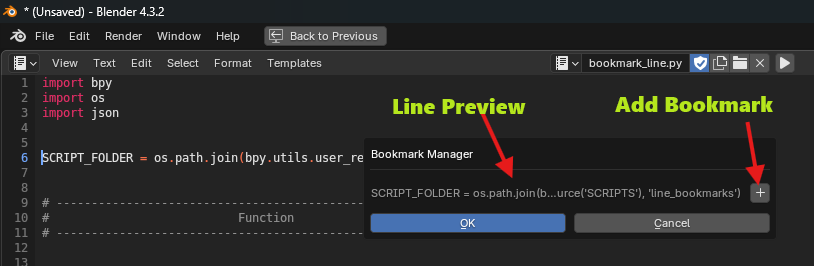
The Bookmark Line tool allows you to bookmark specific lines of code in Blender’s Text Editor. It’s a quick way to mark and revisit important parts of your script during development.
***
### 📍 Location
> **Text Editor Sidebar → Bookmark Line**\
> \
> 
> **`F4` Shortcut** \
> \
> 
{% hint style="info" %}
*You can customize the shortcut from the Textify Preferences*
{% endhint %}
***
### ❓How to Use
{% stepper %}
{% step %}
**Place your cursor** on the line you want to bookmark.
{% endstep %}
{% step %}
**Open the panel** or press **F4** to bring up the Bookmark Manager popup.
{% endstep %}
{% step %}
Click the **Add** button to create a bookmark.
{% endstep %}
{% endstepper %}
✅ The line will be saved as a bookmark and listed in the UI.
Saved Bookmark
***
### Remove Bookmarks
To delete a bookmark:
{% stepper %}
{% step %}
Select the bookmark in the list.
{% endstep %}
{% step %}
Click the **Remove** button.
{% endstep %}
{% endstepper %}
***
### 🔃 Arrange Bookmarks
{% stepper %}
{% step %}
Use the ⬆️ and ⬇️ buttons to **manually reorder** bookmarks.
{% endstep %}
{% step %}
Use the 🔽 (More Options) menu to **sort bookmarks by line number** automatically.
{% endstep %}
{% endstepper %}
***
### 🔄️ Refresh Bookmarks
If your bookmarks look out of sync (e.g., after editing code), click the 🗘 **Refresh** button to update them.